 anypaypos









PROCURE O QUE QUISER
Pesquisar tudoProdutoNotícias
PESQUISAR
A customer-facing display can change the way shoppers interact with the checkout process.
In a traditional single-screen setup, most transaction information is visible only to the cashier. Customers may need to ask about quantities, prices or discounts before completing payment.
A second display creates another communication channel.
Depending on the POS software, it can show selected products, quantities, transaction totals or other order information.
This allows customers to follow the transaction as it happens.
For restaurants or specialty stores, the screen may help customers confirm an order before payment. In retail stores, it can make the final basket easier to review.
The value is not simply that the POS has two screens. The value comes from displaying information that is useful at the correct moment.
When the terminal is not processing a transaction, the customer-facing display may also be used for store communication.
Retailers can use the software to display promotional graphics, membership information, new product announcements or other approved content.
This makes the display useful even during periods when the cashier is waiting for the next customer.
However, promotional content should not interfere with checkout clarity.
Once a transaction begins, the most important information should remain easy to see.
The retailer should also consider viewing distance. Text that looks clear on a designer’s computer may be too small when customers stand a meter away from the counter.
Screen angle and height therefore matter.
Lighting should also be considered. Reflections from windows or overhead lights can reduce readability.
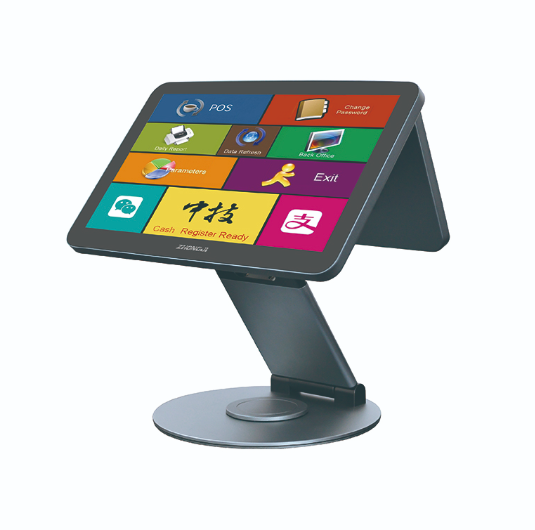
A dual-screen POS project requires both hardware and software preparation.
The POS application must recognize the second display and decide what information appears there.
Different screen resolutions should be tested before deployment.
Retailers should confirm what happens when the second screen is disconnected or restarted.
The main POS system should remain stable even if the customer display temporarily becomes unavailable.
Counter design also needs attention.
The second screen should face the customer without blocking communication with the cashier or taking away important product-handling space.
For chain-store deployment, the viewing angle and screen position can be included in the standard counter design.
This creates a more consistent customer experience across locations.
A customer-facing display should not be treated simply as an additional monitor.
When planned correctly, it can improve transaction visibility, help customers confirm orders and provide another channel for store communication.
The strongest results come from combining suitable hardware positioning with software designed specifically for customer-facing information.
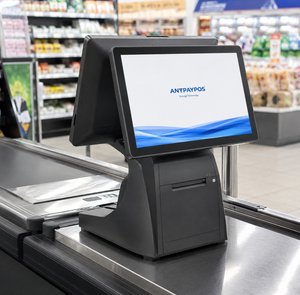
Learn how dual screen POS terminals improve customer interaction, payment confirmation and retail service efficiency.
Ver detalhes
Compare os terminais POS tradicionais com os quiosques de auto-checkout para determinar qual o modelo de checkout mais adequado aos diferentes formatos de retalho e tipos de transação.
Ver detalhes
Compare os terminais de ponto de venda com pessoal e os quiosques de encomendas automáticas ao planear os fluxos de trabalho relativos a encomendas, pagamentos e cozinha num restaurante de fast food.
Ver detalhes
Explore customized POS terminal solutions including hardware configuration, branding, design and OEM production.
Ver detalhes